


Documentation Index

Fetch the complete documentation index at: https://e2b-squash-sandbox-pages.mintlify.app/llms.txt

Use this file to discover all available pages before exploring further.
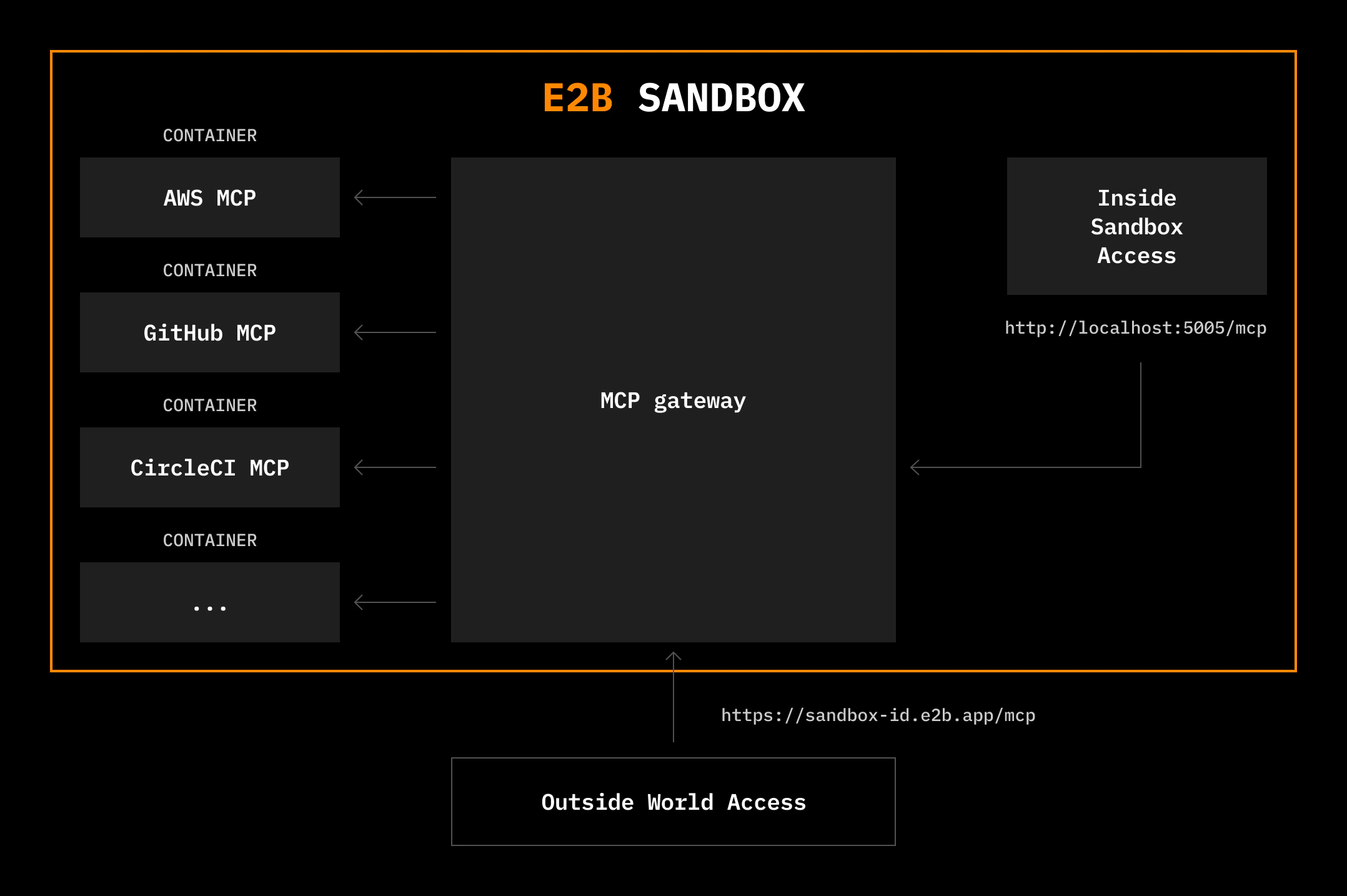
E2B provides a batteries-included MCP gateway that runs inside sandboxes, giving you type-safe access to 200+ MCP tools from the Docker MCP Catalog or custom MCP servers through a unified interface. This integration gives developers instant access to tools like Browserbase, Exa, Notion, Stripe, or GitHub. The Model Context Protocol (MCP) is an open standard for connecting AI models to external tools and data sources. E2B sandboxes provide an ideal environment for running MCP tools, giving AI full access to an internet-connected Linux machine where it can safely install packages, write files, run terminal commands, and AI-generated code.

Quickstart

Create a sandbox with MCP servers configured and connect it to an AI agent. This example sets up Browserbase, Exa, and Airtable MCP servers and uses Claude to orchestrate them.
import Sandbox from 'e2b'

const sbx = await Sandbox.create({
    mcp: {
        browserbase: {
            apiKey: process.env.BROWSERBASE_API_KEY!,
            geminiApiKey: process.env.GEMINI_API_KEY!,
            projectId: process.env.BROWSERBASE_PROJECT_ID!,
        },
        exa: {
            apiKey: process.env.EXA_API_KEY!,
        },
        airtable: {
            airtableApiKey: process.env.AIRTABLE_API_KEY!,
        },
    },
});

const mcpUrl = sbx.getMcpUrl();
const mcpToken = await sbx.getMcpToken();

// You can now connect the gateway to any MCP client, for example claude:
// This also works for your local claude!
await sbx.commands.run(`claude mcp add --transport http e2b-mcp-gateway ${mcpUrl} --header "Authorization: Bearer ${mcpToken}"`, { timeoutMs: 0, onStdout: console.log, onStderr: console.log });

await sbx.commands.run(
    `echo 'Use browserbase and exa to research open positions at e2b.dev. Collect your findings in Airtable.' | claude -p --dangerously-skip-permissions`,
    { timeoutMs: 0, onStdout: console.log, onStderr: console.log }
)

Connecting to the MCP gateway

You can connect to the MCPs running inside the sandbox both from outside and inside the sandbox.

From outside the sandbox

To connect to the MCPs running inside the sandbox, use the sandbox.getMcpUrl() in JavaScript and sandbox.get_mcp_url() in Python.
import Sandbox from 'e2b'
import { Client } from '@modelcontextprotocol/sdk/client/index.js';
import { StreamableHTTPClientTransport } from '@modelcontextprotocol/sdk/client/streamableHttp.js';

const sandbox = await Sandbox.create({
    mcp: {
        browserbase: {
            apiKey: process.env.BROWSERBASE_API_KEY!,
            geminiApiKey: process.env.GEMINI_API_KEY!,
            projectId: process.env.BROWSERBASE_PROJECT_ID!,
        },
        exa: {
            apiKey: process.env.EXA_API_KEY!,
        },
        notion: {
            internalIntegrationToken: process.env.NOTION_API_KEY!,
        },
    },
});

const client = new Client({
    name: 'e2b-mcp-client',
    version: '1.0.0'
});

const transport = new StreamableHTTPClientTransport(
    new URL(sandbox.getMcpUrl()),
    {
        requestInit: {
            headers: {
                'Authorization': `Bearer ${await sandbox.getMcpToken()}`
            }
        }
    }
);

await client.connect(transport);

const tools = await client.listTools();
console.log('Available tools:', tools.tools.map(t => t.name));

await client.close();
await sandbox.kill();

From inside the sandbox

If you need to access the MCP gateway from within the sandbox itself, it’s available at:
http://localhost:50005/mcp
You’ll need to include the Authorization header with the MCP token when making requests from inside the sandbox. How that is added depends on the MCP client you use.

MCP client integrations

Claude

claude mcp add --transport http e2b-mcp-gateway <url goes here> --header "Authorization: Bearer <token goes here>"

OpenAI Agents

import { MCPServerStreamableHttp } from '@openai/agents';

const mcp = new MCPServerStreamableHttp({
    url: mcpUrl,
    name: 'E2B MCP Gateway',
    requestInit: {
        headers: {
            'Authorization': `Bearer ${await sandbox.getMcpToken()}`
        }
    },
});

Official MCP client

import { Client } from '@modelcontextprotocol/sdk/client/index.js';
import { StreamableHTTPClientTransport } from '@modelcontextprotocol/sdk/client/streamableHttp.js';

const client = new Client({
    name: 'e2b-mcp-client',
    version: '1.0.0'
});

const transport = new StreamableHTTPClientTransport(
    new URL(sandbox.getMcpUrl()),
    {
        requestInit: {
            headers: {
                'Authorization': `Bearer ${await sandbox.getMcpToken()}`
            }
        }
    }
);
await client.connect(transport);
This list is not exhaustive. You can find more examples in the E2B Cookbook.

Custom templates

You can prepull MCP server Docker images during template build time to significantly improve runtime performance. When you build a template with prepulled MCP servers, the Docker images for those servers are downloaded and cached during the build process. This means when you create a sandbox from that template, the MCP servers are ready to use immediately without waiting for image downloads.
You must use the MCP gateway enabled template (mcp-gateway) as your base template to use this feature.

Building a template with MCP servers

Use the addMcpServer() method (TypeScript) or add_mcp_server() method (Python) to prepull MCP server images during template build. You can pass a single server or an array of servers. The server names (like "browserbase" and "exa") correspond to the keys defined in the Available Servers documentation.
import "dotenv/config";
import { Template, defaultBuildLogger } from 'e2b';

export const template = Template()
  .fromTemplate("mcp-gateway")
  .addMcpServer(["browserbase", "exa"]);

await Template.build(template, 'my-mcp-gateway', {
  cpuCount: 8,
  memoryMB: 8192,
  onBuildLogs: defaultBuildLogger(),
});

Using the template

Once built, create sandboxes from your template. You still need to provide the configuration for each MCP server.
import { Sandbox } from 'e2b';

const sandbox = await Sandbox.create({
    template: "my-mcp-gateway",
    mcp: {
        browserbase: {
            apiKey: process.env.BROWSERBASE_API_KEY!,
            geminiApiKey: process.env.GEMINI_API_KEY!,
            projectId: process.env.BROWSERBASE_PROJECT_ID!,
        },
        exa: {
            apiKey: process.env.EXA_API_KEY!,
        },
    },
});

For more information about working with templates, see:

Custom MCP servers

In addition to the 200+ pre-built MCP servers from the Docker MCP Catalog, you can run custom MCP servers directly from public GitHub repositories. When you specify a GitHub repository, E2B will:
  1. Clone the repository into the sandbox
  2. Run the installCmd (optional) to install dependencies
  3. Run the runCmd to start the MCP server with stdio transport
The runCmd must start an MCP server that follows the MCP specification and communicates via stdio (standard input/output).
import Sandbox from 'e2b'

const sandbox = await Sandbox.create({
    mcp: {
        'github/modelcontextprotocol/servers': {
            installCmd: 'npm install',
            runCmd: 'sudo npx -y @modelcontextprotocol/server-filesystem /root',
        },
    },
});

Configuration

installCmd
string
Optional command to run before starting the MCP server. Use this to install dependencies (e.g., npm install, pip install -r requirements.txt).
runCmd
string
required
Command to start the MCP server. Must launch a stdio-enabled MCP server.
Important for npx-based servers: Always include installCmd: 'npm install' (or equivalent) when using npx in your runCmd. Without installing dependencies first, npx will try to use the local repository and fail.

Troubleshooting

If your custom MCP server doesn’t work as expected:
  1. Explore the sandbox either via the dashboard or by connecting to it via e2b connect <sandbox-id>
  2. Check the gateway log file with sudo cat /var/log/mcp-gateway/gateway.log.

Debugging with MCP Inspector

The MCP Inspector is a useful tool for debugging and testing your MCP server setup. Get the command to run:
npx @modelcontextprotocol/inspector --transport http --url <your-mcp-url> --header "Authorization: Bearer ${mcpToken}"
Run the command in your terminal. This will open a web interface where you can:
  • Browse available tools
  • Test tool calls with different parameters
  • Inspect request/response payloads
  • Debug connection issues

Examples

Claude Code

Claude Code with MCP integration

Browserbase

Web automation agent with Browserbase

Groq + Exa

AI research using Groq and Exa

Research agent

Research Agent using the OpenAI Agents framework

MCP client

Basic MCP client connecting to an E2B Sandbox

Custom MCP server

Use custom MCP servers installed from GitHub

Custom template

Create a custom E2B Sandbox with pre-installed MCP servers
For the full list of available MCP servers, see Available servers.